Q-Format (Fixed-Point Arithmetic)
Q-Format is a binary, fixed-point number format. Tinymind contains a template library which allows us to specify the number of integer as well as the number of fractional bits as template parameters. Q-Format can be used in lieu of floating point numbers when fixed-point precision is adequate (or when we don’t have an FPU at all!). See Q-Format for a deep dive.
Why Fixed-Point for Embedded?
Many embedded processors – particularly low-power ARM Cortex-M0/M0+ cores, 8-bit and 16-bit MCUs, and older DSPs – lack a hardware floating-point unit (FPU). On these devices, floating-point operations are emulated in software, making them 10-100x slower than equivalent integer operations. Fixed-point arithmetic sidesteps this entirely: Q-format values are stored as plain integers and use the same integer ALU instructions (add, subtract, multiply, shift) that the CPU executes in a single cycle.
Beyond speed, fixed-point also saves memory. Each value is stored in the minimum number of bits the application requires:
| Format | Storage | Fractional Resolution | Dynamic Range |
|---|---|---|---|
| Q8.8 (signed) | 2 bytes | 0.00390625 | -128 to 127.996 |
| Q16.16 (signed) | 4 bytes | 0.0000153 | -32768 to 32767.99998 |
float (IEEE 754) | 4 bytes | ~7 decimal digits | ~3.4e38 |
double (IEEE 754) | 8 bytes | ~15 decimal digits | ~1.8e308 |
For neural networks, Q8.8 resolution (0.004) is sufficient for many classification and control tasks, at 2 bytes per value vs 8 bytes for double – a 4x memory reduction across all weights, biases, and gradients.
Embedded systems also frequently lack standard math libraries. Functions like exp(), tanh(), and sigmoid() are simply not available. Tinymind solves this with pre-computed lookup tables (LUTs) for all activation functions. A LUT evaluation is a single indexed memory access – no floating-point math required. The activation table generator produces LUTs for every supported Q-format resolution, and preprocessor switches ensure you only compile the tables you actually use.
Tinymind QValue
Tinymind contains a C++ template library for defining and using Q format values. The template class is called QValue. The template declaration is here:
template<
        unsigned NumFixedBits,
        unsigned NumFractionalBits,
        bool QValueIsSigned,
        template<typename, unsigned> class QValueRoundingPolicy = TruncatePolicy
        >
struct QValue
{
...
NumFixedBits - Number of bits for the integer portion of the fixed-point value.
NumFractionalBits - Number of bits for the fractional portion of the fixed-point value.
QValueIsSigned - true - 1 bit reserved in the integer portion for the sign bit, false - no sign bit
QValueRoundingPolicy - A template template parameter which specifies a policy class to handle rounding. Tinymind provides 2 options but you can define your own as well. One option which tinymind provides is TruncatePolicy. This rounds the Q format value by dropping the lower bits (e.g. integer division does this). The other option which tinymind provides is RoundUpPolicy. RoundUpPolicy rounds up to the nearest fractional value.
Example Use
Using the template, we can declare types for virtually any kind of Q-Format quantity. Some examples from the unit test (qformat_unit_test.cpp):
typedef tinymind::QValue<24, 8, true> SignedQ24_8Type; // 24 bits of integer, 8 bits of fractional, signed
typedef tinymind::QValue<16, 16, true> SignedQ16_16Type; // 16 bits of integer, 16 bits of fractional, signed
typedef tinymind::QValue<24, 8, false> UnSignedQ24_8Type; // 24 bits of integer, 8 bits of fractional, unsigned
typedef tinymind::QValue<8, 24, true> SignedQ8_24Type; // 8 bits of integer, 24 bits of fractional, signed
Instance of this type can be declared and initialized like any other class:
SignedQ24_8Type Q8(-1, 0);
Here we declare and initialize a signed Q24.8 value to its representation of negative one. We can use this variable as if it were a plain old integer:
SignedQ24_8Type Q6(-1, 0);
SignedQ24_8Type Q7(1, 0);
SignedQ24_8Type Q8;
...
Q8 = Q6 + Q7;
BOOST_TEST(static_cast<SignedQ8_24Type::FullWidthValueType>(0x0) == Q8.getValue());
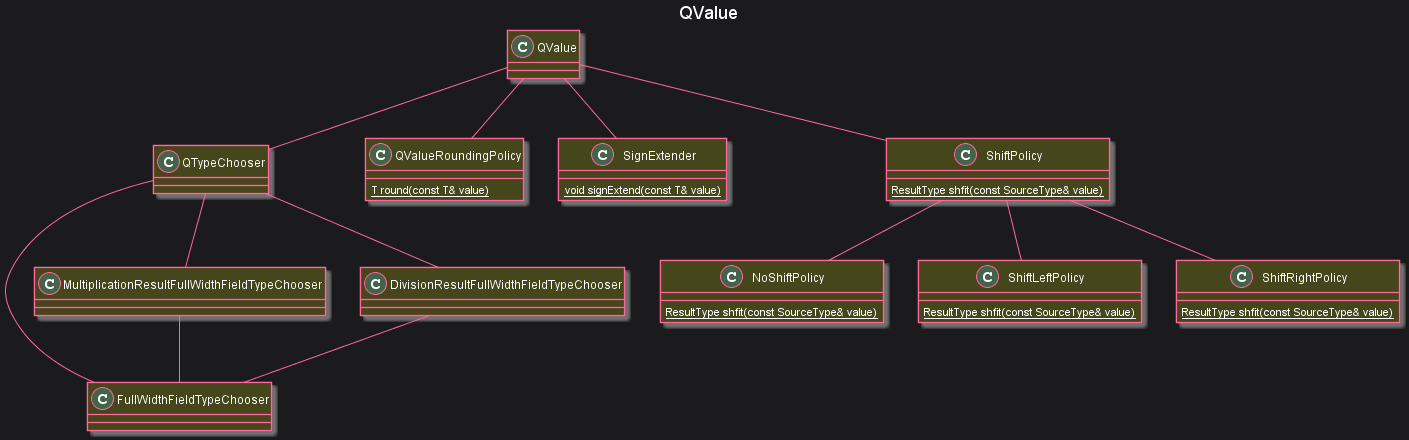
QValue Class Diagram
QValue uses several classes within qformat.hpp to accomplish its goals. The relationship between the classes is presented here.
Compile-Time Type Selection
QValue uses compile-time type selection to choose the minimally-sized types for: Fixed part, fractional part, as well as the whole value representation (fixed + fractional).
template<
        unsigned NumFixedBits,
        unsigned NumFractionalBits,
        bool QValueIsSigned,
        template<typename, unsigned> class QValueRoundingPolicy = TruncatePolicy
        >
struct QValue
{
...
    typedef typename QTypeChooser<NumberOfFixedBits, NumberOfFractionalBits, IsSigned>::FullWidthValueType                     FullWidthValueType;
    typedef typename QTypeChooser<NumberOfFixedBits, NumberOfFractionalBits, IsSigned>::FixedPartFieldType                     FixedPartFieldType;
    typedef typename QTypeChooser<NumberOfFixedBits, NumberOfFractionalBits, IsSigned>::FractionalPartFieldType                FractionalPartFieldType;
    typedef typename QTypeChooser<NumberOfFixedBits, NumberOfFractionalBits, IsSigned>::FullWidthFieldType                     FullWidthFieldType;
    typedef typename QTypeChooser<NumberOfFixedBits, NumberOfFractionalBits, IsSigned>::MultiplicationResultFullWidthFieldType MultiplicationResultFullWidthFieldType;
    typedef typename QTypeChooser<NumberOfFixedBits, NumberOfFractionalBits, IsSigned>::DivisionResultFullWidthFieldType       DivisionResultFullWidthFieldType;
    typedef QValueRoundingPolicy<MultiplicationResultFullWidthFieldType, NumberOfFractionalBits>                               RoundingPolicy;
As you can see from the code snippet above, it does this via a template class whose purpose is to choose the optimal types, QTypeChooser.
The representation of the Q-Format value is stored within QValue as a union.
union
{
    struct
    {
        FractionalPartFieldType mFractionalPart : NumberOfFractionalBits;
        FixedPartFieldType mFixedPart : NumberOfFixedBits;
    };
    FullWidthFieldType mValue;
};
This allows us to operate upon Q-Format values as if they were regular integers. Most of the code within qformat.hpp is providing the operator overloads necessary to treat QValues as if they were regular integers.
Using QValues
From the unit test (qformat_unit_test.cpp) we can study how QValues are used. Since we should be supporting all common mathematical operators, we can treat them as if they are normal PODs (plain-old data).
Compiling The Unit Tests
To compile the unit tests, switch to the unit_test/qformat/ directory and use make to build them.
cd unit_test/qformat
make
Change directories to the output directory to run the unit tests.
cd ./output/
./qformat_unit_test
You should see the output below:
Running 10 test cases..


*** No errors detected
Addition
We can add both other QValues of the same type as well as integers which have the same underlying representation of the full value.
BOOST_AUTO_TEST_CASE(test_case_addition)
{
    UnsignedQ8_8Type uQ0(0, 0);
    UnsignedQ8_8Type uQ1(0, 1);
    UnsignedQ8_8Type uQ2(1, 1);
    UnsignedQ8_8Type uQ3;
...
    uQ0 += 0;
    BOOST_TEST(static_cast<UnsignedQ8_8Type::FullWidthValueType>(0) == uQ0.getValue());

    uQ0 += uQ0;
    BOOST_TEST(static_cast<UnsignedQ8_8Type::FullWidthValueType>(0) == uQ0.getValue());

    uQ0 += uQ1;
    BOOST_TEST(static_cast<UnsignedQ8_8Type::FullWidthValueType>(1) == uQ0.getValue());
QValues can be added to each other as well as to integer constants.
Subtraction
Subtraction is a similar story. We can subtract QValues from other QValues of the same type as well as subtract integers from QValues.
uQ3 = uQ0 - uQ1;
BOOST_TEST(static_cast<UnsignedQ8_8Type::FullWidthValueType>(0x100) == uQ3.getValue());
Multiplication
QValues can be multiplied by each other as well as by integer values, just like normal PODs.
uQ2 = uQ0 * uQ1;
BOOST_TEST(static_cast<UnsignedQ8_8Type::FullWidthValueType>(0x101) == uQ2.getValue());

uQ2 = uQ1 * 2;
BOOST_TEST(static_cast<UnsignedQ8_8Type::FullWidthValueType>(0x200) == uQ2.getValue());
Division
QValues can be divided by each other as well as by integers just like normal PODs.
uQ2 = uQ1 / 2;
BOOST_TEST(static_cast<UnsignedQ8_8Type::FullWidthValueType>(0x80) == uQ2.getValue());
Comparators
QValues can be compared against other QValues as well as against integers.
BOOST_TEST(uQ0 > uQ1);
BOOST_TEST(uQ1 < uQ0);
BOOST_TEST(uQ2 <= uQ1);
BOOST_TEST(uQ2 >= uQ1);
Conversion
QValues can be assigned values after conversion from another QValue type.
SignedQ8_8Type Q0;
SignedQ8_24Type Q1(1, 0);

Q0.convertFromOtherQValueType(Q1);
BOOST_TEST(Q0.getValue() == 0x100);
Overflow/Saturation Policies
QValue supports configurable overflow behavior via saturation policies. Two policies are provided:
WrapPolicy (default) - Standard wrap-around behavior. No overflow checking is performed. This is the fastest option and matches how regular integer arithmetic works.
MinMaxSaturatePolicy - Clamps results to the representable range [minValue, maxValue]. If an addition would overflow, the result is clamped to the maximum value. If a subtraction would underflow, the result is clamped to the minimum value. Division by zero returns the maximum or minimum value based on the sign of the numerator.
// QValue with saturation (clamps instead of wrapping on overflow)
typedef tinymind::QValue<8, 8, true, tinymind::RoundUpPolicy, tinymind::MinMaxSaturatePolicy> SaturatedQ8_8Type;

// QValue with default wrap behavior
typedef tinymind::QValue<8, 8, true> WrappingQ8_8Type;
MinMaxSaturatePolicy is especially important for neural network training with fixed-point, where accumulated gradients or large learning rates can push values beyond the representable range.
128-Bit Support
On platforms that support __int128 (GCC, Clang), QValue can use up to 64 bits total (e.g. Q32.32) because intermediate multiplication and division results use 128-bit arithmetic. On platforms without __int128, the maximum is 32 bits total (e.g. Q16.16) with 64-bit intermediates.
Float and Double Support
While QValue is designed for fixed-point arithmetic, the tinymind neural network templates also support float and double directly as the ValueType. When using floating-point types, the neural network code uses standard floating-point arithmetic and math functions instead of lookup tables. This is useful for:
- Prototyping and validating network architectures before converting to fixed-point
- Platforms that have an FPU where floating-point is more efficient
- Comparing fixed-point results against floating-point ground truth
Conclusion
QValues represent Q-Format numbers for systems which either do not have floating point or for scenarios where a fixed point resolution is sufficient. QValues can be treated as normal PODs. Addition, subtraction, division, and multiplication can all be performed upon QValues as if they were plain old integers.