KWS Cortex-M (float pipeline)
A keyword-spotting-style depthwise-separable CNN built from the standalone 2D layers, run on the host with the benchmark harness so every layer reports its per-call compute cost and memory footprint. This is the float baseline that the int8 pipeline is measured against.
How it works
- Pipeline:
Conv2D 3x3 (8 filters)→MaxPool2D 2x2→DepthwiseConv2D 3x3→PointwiseConv2D 8→16→GlobalAvgPool2D→PointwiseConv2D (dense) 16→10, over a20x20x1input in NHWC layout. - Everything is statically allocated — no heap, no RTTI, no exceptions. The
benchharness (cpp/include/bench/) times each layer and records weight + activation bytes;weight_bytesincludes the gradient arrays since the float layers store weights and gradients together for on-device training. - Demonstrates the depthwise-separable factorization (a depthwise 3x3 followed by a 1x1 pointwise mixer) as a cheaper substitute for a dense conv, plus
GlobalAvgPool2Dreplacing a large flatten-to-dense matrix.
Build and run
cd examples/kws_cortex_m
make release
make run
make plot      # needs matplotlib; a venv/pyenv works if it is not already in your Python
make csv runs the binary and extracts the per-layer CSV block to output/kws_cortex_m.csv; make plot regenerates the chart from that CSV. The runner also ships port_stub.hpp and a porting guide: compile with -DTINYMIND_BENCH_CORTEX_M to read DWT->CYCCNT instead of the host nanosecond fallback, and swap std::cout for a UART sink.
Output
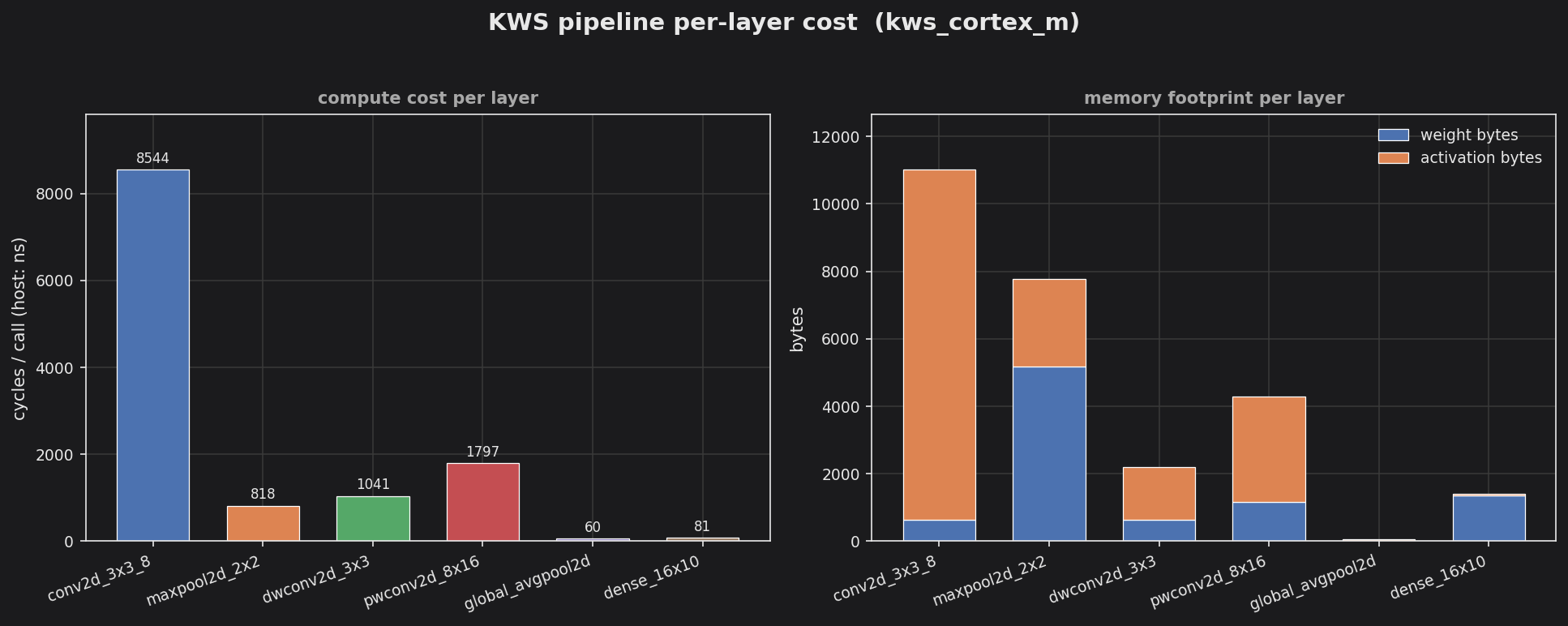
The left panel shows per-call compute cost (host nanoseconds): the leading Conv2D 3x3 dominates at ~8500 ns, with the pointwise mixer a distant second. The right panel splits each layer’s footprint into weight bytes (blue) and activation bytes (orange) — the early conv layers carry the largest activation tensors, which is the budget the int8 pipeline cuts by storing activations as one byte instead of four.